
User Guide
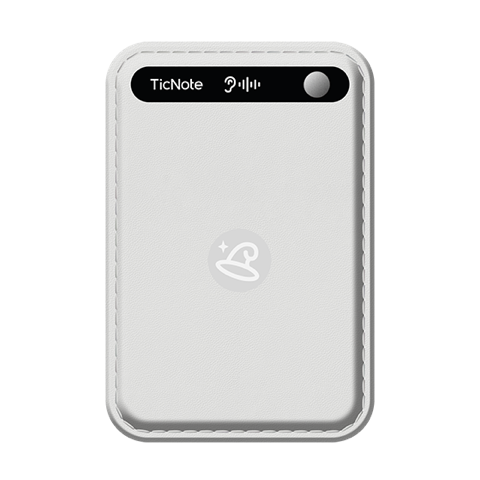
89 × 58 × 5.8mm plastic PC/ABS body (Black / White / Pink / Misty Blue / Sage Green), built-in 64GB eMMC storage supporting 434 hours of recording. Built-in magnetic case for easy attachment. All device data is wiped automatically after unbinding.
Magnetic Type-C charging cable, 300mm length, 0.4A output, 10g weight. Full charge in 1.5 hours. Continuous recording over 20 hours on a single charge (25 hours for overseas market), standby over 20 days.
Magnetic ring accessory (ID 45mm / OD 55mm / Thickness 0.6mm) attaches to the back of any phone case for magnetic TicNote mounting. Strong adhesive, stays in place during exercise.
Includes quick-start manual, warranty guide, and a leather case. Covers device activation, TicNote App setup, and basic operation. Get up and running in 3 minutes.
2 omni + 1 bone, simultaneous 3-stream capture
0.42-inch status screen
20h recording / 20d standby
64GB built-in storage
Download the TicNote App
TicNote is supported by the TicNote App. Search "TicNote" on the App Store (iOS) or Google Play (Android) to download and install.
China: ticnote.cn/download · International: ticnote.com/download
Activate & Add Device
Long press the record button for 2 seconds to power on; the device vibrates. Open the TicNote App, tap "+ Add Device" on the home screen; the system searches for nearby TicNote Lite devices via BLE 5.0 / Wi-Fi 2.4G.
Tip: Make sure Bluetooth is enabled and keep the device within 5–10 meters with no obstacles.
Pairing Complete
The TicNote App shows "Paired Successfully"; the OLED displays a standby icon. TicNote is ready — long press the record button for 2 seconds to start or stop recording. Long press for 15 seconds to reset the device.
You're all set! Use the app to browse recordings, AI transcripts, and summaries. Recordings are saved in Ogg; playback supports Ogg and AVO (opus).
Magnetic Attachment
Hold TicNote near the back of your phone (above the camera); the magnetic system auto-aligns and attaches firmly. For non-magnetic phones, attach the magnetic ring (ID 45mm, OD 55mm) to the phone case.
One-Tap Record
Long press the record button for 2 seconds; the device vibrates and the OLED shows recording status. Long press again for 2s to stop. TicNote does not distinguish on-site recording mode from call recording mode — a wide range of scenarios (on-site meetings, lectures and training, earpiece calls, business calls, etc.) can be recorded directly. The device has a built-in 3-microphone array (2 omnidirectional digital silicon mics + 1 bone conduction mic). Once powered on, all three audio streams are captured simultaneously, processed by the on-device algorithm, and rendered into clean, ready-to-use recordings.
File Transfer
Recordings are saved in Ogg format and transferred via BT 5.0 BLE or Wi-Fi 2.4G to the TicNote App. Playback supports Ogg and AVO (opus). Keep an effective pickup distance of 5–10 meters for best audio quality.
Charge & Reset
Charge with the magnetic Type-C cable (0.4A output); full charge in 1.5 hours. Continuous recording over 20 hours (25 hours for overseas market); standby over 20 days. To reset, long press the record button for 15 seconds. All device data is wiped automatically after unbinding.
TicNote does not distinguish on-site recording mode from call recording mode — a wide range of scenarios (on-site meetings, lectures and training, earpiece calls, business calls, etc.) can be recorded directly. The device has a built-in 3-microphone array (2 omnidirectional digital silicon mics + 1 bone conduction mic). Once powered on, all three audio streams are captured simultaneously, processed by the on-device algorithm, and rendered into clean, ready-to-use recordings.
Recordings are saved in Ogg format; keep an effective pickup distance of 5–10 m.
* Data sourced from TicNote official hardware specification.