TicNote is an intelligent note-taking application that integrates voice-to-text, AI intelligent polishing, and knowledge base management. Through the deep application of AI technology, TicNote is not just a note-taking tool, but your second brain, helping you think, learn and create better.
TicNote User Guide
Accessories List

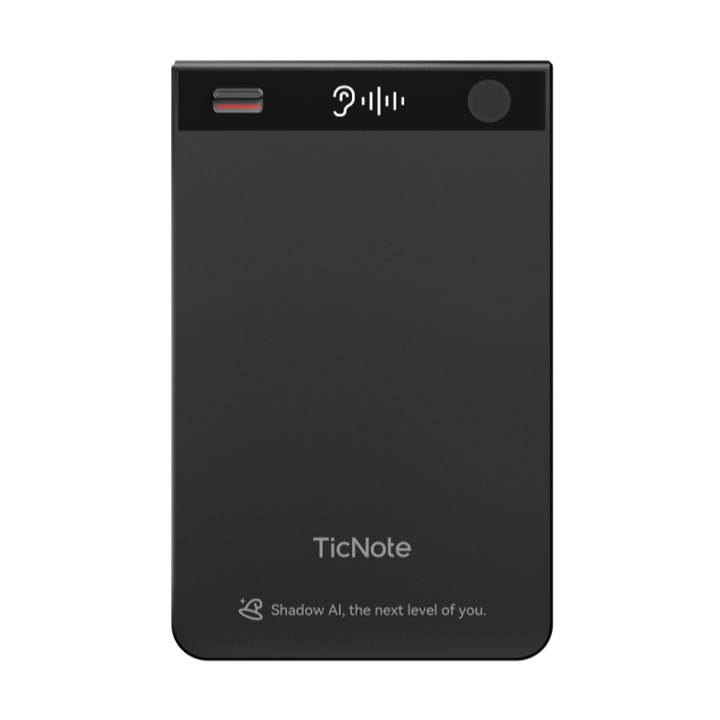
TicNote Card Host
Only 3mm ultra-thin body, made of aerospace aluminum alloy CNC integrated molding, anodized process gives delicate feel. Built-in 64GB eMMC storage space, supports 400+ hours of recording. Supports MagSafe magnetic attachment, easily attaches to iPhone 12 and above. After device unbinding, hardware data will be automatically cleared
USB Charging Cable
Standard charging cable, Type-C / USB-A interface randomly shipped. Charging takes about 2 hours to fully charge the battery. Strong battery life, can continuously record for more than 20 hours when fully charged, meeting all-day usage needs
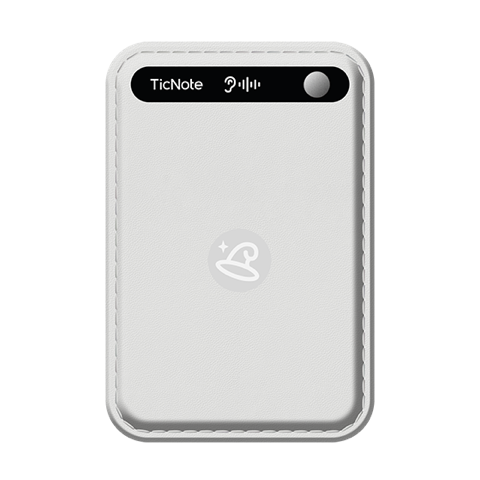
MagSafe Magnetic Ring
Magnetic adaptation solution specially designed for non-MagSafe phones. Using strong adhesive, after attaching to the back of the phone case, any phone can have MagSafe magnetic capability. Strong magnetic force, won't fall off even during running or sports
Quick Start Guide
Paper user manual covering device activation, APP download and binding, basic operation demonstrations and other core function instructions. Illustrated design allows you to get started in 3 minutes and quickly experience TicNote's intelligent charm
✨ Technical Highlights
3-Microphone System
1 bone conduction + 2 omnidirectional silicon mics, intelligent mode switching
120+ Languages
Real-time transcription and translation, 98% accuracy
Ultra-Long Battery Life
More than 20 hours continuous recording, 2-hour fast charging
64GB Large Capacity
Can store 400+ hours of recordings
Device Binding

Download TicNote APP
Search for "TicNote" in the App Store (iOS) or app store (Android), click to download and complete installation. APP size is about 150MB, supports iOS 13+ and Android 8+ systems
Tip: When opening the APP for the first time, you need to grant microphone, Bluetooth, and notification permissions to ensure a complete functional experience

Activate and Add Device
Long press the TicNote Card power button for 0.5 seconds to turn on, the device will vibrate for feedback, but the screen will not show any changes. At this time, open the APP, click the "+ Add Device" button on the homepage, the system will automatically search for nearby TicNote devices. After completing the connection, a waiting recording icon (speaker or earpiece mode corresponding icon) will appear on the TicNote device
Note: Make sure the phone's Bluetooth is turned on, the device is within 5 meters of the phone, and avoid obstacles blocking

Binding Successful, Start Using
The APP displays a "Binding Successful" prompt, and the device screen shows the waiting recording icon. At this time, TicNote Card is ready, long press the power button for 2 seconds to start recording, and the recording content will be synchronized to the APP in real time and automatically transcribed into text
Binding Complete! You can now:
- Long press power button for 2 seconds to start/end recording
- View real-time transcribed text in APP
- Use AI functions to generate summaries and translations
Encountering Connection Issues?
Device Cannot Be Found
- Confirm device is charged and has sufficient battery
- Long press power button for 15 seconds to restore factory settings (will not delete device data)
- Restart phone Bluetooth, clear paired list
Binding Failed or Disconnected
- Ensure distance is within 5 meters, no obstacles
- Close other Bluetooth devices causing interference
- Update APP to the latest version
User Guide

📖 Quick Start Guide
🧲 Magnetic Attachment of Device
Bring TicNote Card close to the MagSafe area on the back of the iPhone (above the camera), the magnetic system will automatically align and firmly attach, a "click" sound indicates successful attachment. For non-MagSafe phones, attach the magnetic ring first to enjoy the same convenient magnetic experience
🎙️ One-Touch Recording
Long press the power button for 2 seconds, the device immediately vibrates for feedback, OLED display screen shows recording status, and starts recording. TicNote supports both online recording and offline recording dual modes: online recording allows real-time transcription and quick file synchronization; during offline recording, the device works independently, and recording files will automatically sync to the APP when the APP reconnects to the device, then upload to the cloud. When fully charged, it can continuously record for more than 20 hours, meeting the needs of long meetings, lectures, and other scenarios
✍️ Real-Time Transcription and Translation
Open the TicNote APP, recording content will be transcribed as you speak into text, no need to wait for the recording to end. Supports 120+ language recognition (Chinese accuracy 98%), and can also translate into other languages in real time. AI intelligently identifies up to 50 speakers, automatically distinguishing different speakers, making meeting minutes clearer
💾 End Recording and Cloud Storage
Long press the power button again for 2 seconds to end recording, OLED display screen shows end status, device vibrates twice for confirmation. Recording files are automatically saved to the APP cloud, ensuring data security. You can view, edit, and share anytime in the APP, supporting export to PDF, Word, TXT, and other formats
📱 Compatible with All Phones
MagSafe Native Devices
iPhone 12 / 13 / 14 / 15 series come with MagSafe magnetic function, no accessories needed, can be directly attached for use. Strong and stable magnetic force, won't fall off even during intense sports like running and cycling
All Other Phones
Android, older iPhones, and other non-MagSafe devices can use the included magnetic ring. Attach the magnetic ring to the back of the phone case (recommended to align above the camera) to enjoy the same magnetic experience as native MagSafe
💡 Usage Tips
Magnetic Alignment
Hearing a clear "click" sound means the magnetic attachment is secure, ready for use
Online/Offline Recording
Online recording supports real-time transcription and fast synchronization; offline recording allows the device to work independently, with files syncing automatically upon reconnection
Noise Reduction Distance
Optimal sound pickup distance is 3-5 meters, AI noise reduction automatically filters out environmental noise like keyboards and air conditioning
Recording Modes
Dual-Mode Intelligent Recording System
Based on different usage scenarios, TicNote Card provides two professional recording modes with intelligent switching to ensure optimal sound quality and recognition accuracy
Speaker Mode
Default Mode · Slide Switch Down · OLED Display
Applicable Scenarios
Meeting minutes, classroom lectures, interview recordings, training speeches, seminars, and other open environments
Sound Pickup Capability
3-microphone intelligent system: Earpiece mode (1 bone conduction mic + 1 omnidirectional digital silicon mic) suitable for phone recording; Speaker mode (2 omnidirectional digital silicon mics) suitable for meetings/lectures, clear sound pickup, AI intelligently recognizes multi-person conversations
Technical Features
16kHz sampling rate recording, AI noise reduction algorithm filters environmental noise in real time (keyboard sounds, wind noise, air conditioning sounds, etc.)
💡 Usage Tip: Place the device in the center of the table or clip it on a notebook to get the best omnidirectional sound pickup effect
Earpiece Mode
Phone Recording · Slide Switch Up · OLED Display
Applicable Scenarios
Phone interviews, customer service recordings, remote meetings, phone consultations, business communications, and other call scenarios
Working Principle
Automatically detects phone call status, synchronously records two-way call content (your side + other side), transcribes into text in real time
Switching Method
Slide the switch on the side of the device upward, OLED display screen shows "Earpiece Mode" icon to indicate successful switch
⚠️ Important Note:
• iOS System: Need to place TicNote close to the earpiece position
• Android System: Supports global recording, no position limitation
📸 Illustrated Usage Methods

Mode Switching Guide
Switch between speaker/earpiece modes via the slide switch, OLED screen displays current status in real time

Magnetic Alignment Demo
Bring the card close to the back of the iPhone, magnetic force automatically aligns above the camera area, click sound confirms successful attachment

Magnetic Ring Installation Tutorial
After attaching the magnetic ring to non-MagSafe phones, enjoy the same convenient magnetic experience as native MagSafe
🤖 AI Intelligent Enhancement
Intelligent Noise Reduction
AI algorithm filters keyboard, wind noise, air conditioning, and other environmental interference in real time
Multi-Speaker Recognition
AI intelligently recognizes speakers, making meeting minutes clearer
Real-Time Translation
Supports 120+ languages for simultaneous recording and translation, enabling cross-language communication
FAQ
TicNote Lite User Guide
What's in the box
💡Product position: entry-level ultra-light recording kit
TicNote Lite is built for budget-minded users: core recording & transcription kept, display and premium extras removed, price lowered. Perfect for students, first-job professionals, or anyone who needs simple on-the-go notes.

TicNote Lite main unit
Thinner & lighter body (5.8 mm, 40 g), no display to cut cost. 64 GB built-in memory stores 400+ h of audio. >20 h continuous recording on a full charge—enough for daily use.
USB-C charging cable
Standard 5 V / 1 A Type-C, 2.5 h to full. Works with phone chargers and power banks—no extra brick needed.
Quick-start card
Concise steps for pairing, OLED icons and basic operations. Scan the code for the full online manual.
📺 OLED status icons
🔵 Bluetooth pairing
Waiting to pair
🔄 OTA update
Firmware upgrading
📡 Wi-Fi quick-transfer
File transfer active
🎙️ Recording
Recording in progress
🔌 Charging
Battery charging
🪫 Low battery
Battery low warning
🔋 Fully charged
Battery full
📊 Lite vs Standard
| Feature | TicNote Card | TicNote Lite |
|---|---|---|
| Model | NE-79 | NE-79 |
| Dimensions | 86×55×3 mm | 94×58×5.8 mm |
| Weight | 29 g ✓ | 40 g |
| Shell | Aluminium ✓ | PC/ABS plastic |
| Storage | 64 GB ✓ | 64 GB ✓ |
| Recording hours | 434 h ✓ | 434 h ✓ |
| Display | 0.42" OLED ✓ | 0.42" OLED ✓ |
| Bluetooth | BLE 5.0 | BLE 5.0 |
| Network | BT5.0 BLE / Wi-Fi 2.4 G | BT5.0 BLE / Wi-Fi 2.4 G |
| Mics | Handset: 1 bone-conduction + 1 omni Speaker: 2 omni ✓ | 1 bone-conduction + 2 omni |
| Recording mode | Dual (handset / speaker) ✓ | Standard |
| Battery | 470 mAh Li-Po | 470 mAh Li-Po |
| Recording endurance | >20 h ✓ | >20 h ✓ |
| Standby | >20 days ✓ | >20 days ✓ |
| Charge time | 1.5 h | 1.5 h |
| Charge port | Magnetic Type-C | Magnetic Type-C |
| Pick-up range | 10 m ✓ | 10 m ✓ |
| Magnetic kit | Ring (ID 45 mm, OD 55 mm) | Built-in ring ✓ |
| Package weight | 204 g | 188 g ✓ |
Best for: students, young pros, or anyone wanting core recording at a lower price.
Device pairing

Install the TicNote app
Search "TicNote" in the app store. Grant microphone, Bluetooth and notification permissions when asked.
Lite and Standard editions share one app; data is synced across the same account.

Power on & search
Press the power button 0.5 s; the OLED shows the Bluetooth icon. In the app tap "+ Add device" and let it search.
The OLED keeps you informed of every status change.

Paired
App shows "Device connected" and the OLED ticks. Battery and recording status are now visible in both places.
Done! Hold the power key 2 s to start your first recording.
Using TicNote Lite
🎯 Core operations
Start recording
Hold power key 2 s
Stop recording
Hold power key 2 s again
Auto-sync
Files upload to cloud when phone is nearby
Read transcript
Open the app to see live text
💎 Key highlights
Offline recording
Record without phone; 8 GB holds ~100 h. Syncs automatically when back in range.
Simplified use
One-button design, OLED feedback—easy for kids & seniors.
Great value
60-70 % of Standard price while keeping AI transcription, cloud sync & multi-speaker ID.
💡 Tips
- Check battery: view in the app—no display on device.
- Offline mode: recordings are cached; they upload once you’re back.
- Reset: hold power 15 s to reboot.
FAQ
TicNote Pods User Guide
What's in the box
👑Product position: the perfect fusion of AI recording & open-ear headphones
TicNote Pods is the flagship of the TicNote family—the world’s first 2-in-1 headphone + recorder. Enjoy premium open-ear sound and professional recording & transcription at the same time. Built for business people, content creators and anyone who demands high audio quality.


📦 Accessories in detail
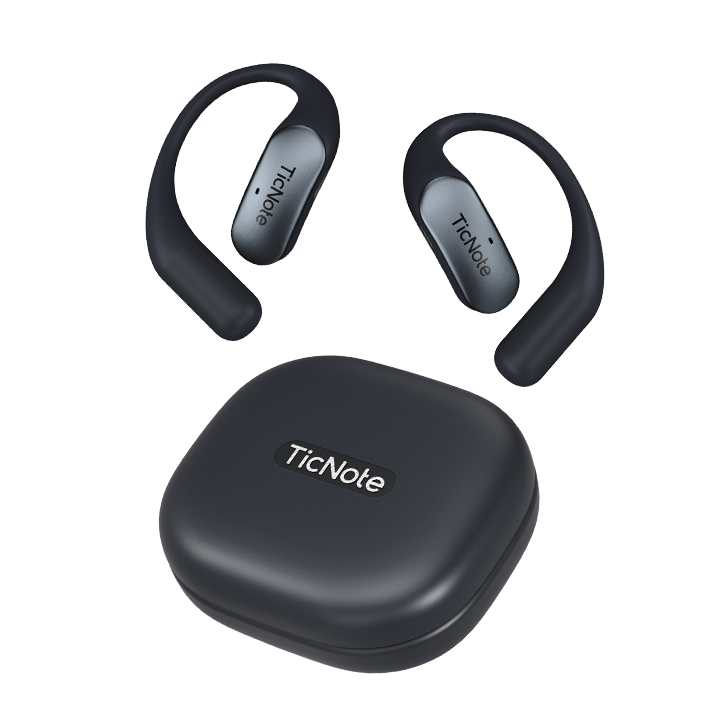
TicNote Pods earphones
Dual mics on each side, 13.4 mm dynamic drivers, AAC/SBC codecs. Open-ear design, only 4.5 g per bud—comfortable for all-day wear.
Charging case
Built-in 750 mAh battery supplies 3 full extra charges. Type-C wired charging. Magnetic lid opens with one hand and shows battery LEDs.
Type-C charging cable
Standard Type-C port. Case fully charges in ~2 h, buds in ~1.5 h. Works with common phone/tablet chargers.
Quick-start card
Illustrated guide for wearing, touch controls, app pairing and recording-mode switch. Scan the code for the full online manual.
🚀 Tech highlights
Open-ear comfort
No in-ear pressure, long-wearing comfort
Dual-mic system
Clear calls & recordings, captures every word
28 h total battery
7 h per charge + 3 recharges from case
Type-C charging
Standard port, magnetic lid for easy open/close
Device pairing

Download app

Quick start

Enter pairing

Connected

Wearing guide

Recording mode
Using TicNote Pods
🎯 Double-tap the earbud panel
Incoming call
Double-tap either bud to answer
During call
Double-tap to hang up
Music playing
Double-tap to skip to next track
FAQ
TicNote APP Features
Smart Recording · AI Enhancement · Knowledge Management, Redefining Your Second Brain
More Than Recording, Your Intelligent Thinking Partner
TicNote deeply integrates AI technology to not only help you record, but also think, learn, and create
I. Professional Recording
Stable and Efficient Recording Engine
Extended Recording Duration
Single recording up to 20+ hours, stable and uninterrupted. Supports online and offline recording, with real-time transcription in online mode and automatic sync after reconnection in offline mode
Real-time Transcription & Translation
Transcribe as you speak, supporting 120+ languages. Chinese accuracy rate of 98%, supports 27 dialect recordings. Real-time translation breaks language barriers
Multimedia Recording
Add text notes, photos, and timestamps during recording. Mark key moments with the mark button for easy timeline review
II. AI Content Organization
Intelligently Extract Core Value
One-Click Auto Summary
AI automatically generates meeting minutes and lecture summaries. Supports multiple styles (concise, detailed, bullet points). Conclusion-first approach for quick comprehension
Mind Map Generation
Automatically generate structured mind maps based on summaries. Visualize logical relationships to clarify thinking. Export as images for sharing
「Aha」Insight Discovery
AI proactively discovers hidden value points in conversations—those implicit but important ideas, inspirations, and insights. Never miss any brilliant moment
Deep Research Assistant
Aggregate related materials, generate structured research reports, with all viewpoints having traceable citations. A powerful tool for academic writing and industry analysis
One-Click Podcast Generation
Synthesize publishable audio content directly from transcripts. Supports playlist management with professional recording quality. A blessing for content creators
III. Projects & Shadow
Build Your Second Brain
Automatic Project Building
AI automatically identifies themes and builds personal projects based on file content and conversation records. Manage knowledge by project dimensions, say goodbye to scattered files. Supports nested sub-projects to build knowledge systems
Intelligent AI Q&A
Cross-project search through all your knowledge bases, accurately answering any question. Every answer is marked with citation sources, clickable to jump to the original text. Bring dormant knowledge to life
🎯 All Core Features Overview
Real-time Transcription
Multilingual Translation
Multi-speaker Recognition
Cloud Sync
Tag Classification
Voice Search
Version Updates
Learn about TicNote's latest features and improvements
Contact Us
We are always here to provide help and support
WeChat Customer Service

Scan the QR code to add dedicated customer service WeChat for one-on-one personalized service